



Better Canvas is a free browser extension that redesigns the Canvas LMS dashboard with dark mode, custom themes, a GPA calculator, and a smarter to-do list. It’s been rebranded to BetterCampus, though both names point to the same tool and it’s used by more than 1.5 million students. It only works on Chrome and Firefox, not Safari, and setup takes about two minutes with no account required for the basic features.
That’s the short version. Most guides stop there. What actually matters, if you’re deciding whether to install it, is the stuff underneath: who built it and why the name changed, what data it actually touches, why it won’t show up on your iPhone’s Safari, and what the free tier leaves out compared to the $119 a year Pro plan. Let’s get into it.
What Happened to Better Canvas? Why It’s Now Called BetterCampus
If you searched “what happened to Better Canvas” because the extension you had installed suddenly looks different, here’s the answer: nothing broke. The company renamed itself.
The tool started as a side project, not a startup. A high school student named George Mills built the first version during the pandemic, when remote learning through Canvas felt flat and impersonal. He kept coding on it through college, adding dark mode and card customization mostly for himself and his classmates.
The real growth spike came later, in 2024, when students started posting their customized Canvas dashboards on TikTok. Watching someone turn a gray gradebook into a pastel, theme-coordinated dashboard is oddly satisfying content, and it worked. Downloads jumped from the low thousands into the millions within a year.
That kind of growth attracts attention. Jake Silver, who works in product strategy and ed-tech scaling, partnered with Mills to turn the browser extension into a proper platform. BetterCampus is the result: still built on the same Better Canvas codebase, but now with a pricing tier, an institutional pilot program for schools, and a roadmap that goes beyond a single extension.
Practically, nothing changes for you if you already have it installed. The Chrome Web Store listing itself is labeled “BetterCampus (prev. BetterCanvas)” so search traffic under either name lands on the same page. The GitHub repository is still public under the original name too, which matters if you want to verify what the code is doing before you trust it near your gradebook.
Is Better Canvas Safe to Use?
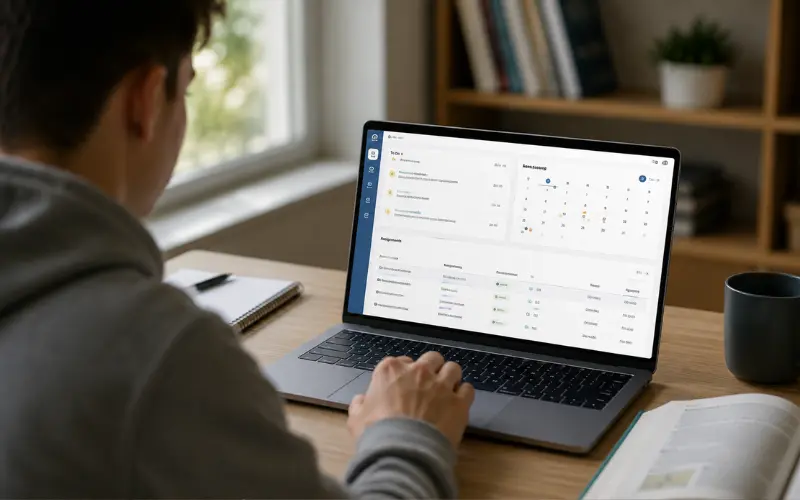
This is the question that actually deserves real research, not a one-line reassurance. Here’s what I found checking the extension’s own disclosures rather than taking marketing copy at face value.
- The permission scope is narrower than people assume. The Chrome Web Store’s privacy section lists exactly one data category the extension handles: user activity, meaning how you interact with the Canvas interface itself. It’s not requesting access to your browsing history, other tabs, or your school email.
- The developer has a clean track record. Chrome flags publishers with a history of policy violations, and this one carries none. It also discloses a real business address, a working phone number, and a support email, rather than hiding behind an anonymous developer account, which is common among sketchy Canvas add-ons.
- The code is open source. You, or your school’s IT department, can read the actual source on GitHub instead of trusting a privacy policy. For a tool that sits on top of your grades and assignments, that’s a meaningfully higher bar than most Canvas extensions clear.
- Third-party scans back it up. Independent listings that run the extension through VirusTotal come back clean: no malware, no spyware, no flagged behavior.
One honest caveat: Better Canvas explicitly states it is not affiliated with or endorsed by Instructure, the company behind Canvas. That’s normal for browser extensions, but it means if Canvas pushes a UI update, there can be a short lag before the extension catches up and some visual elements look slightly broken until the next release patches it. I’ve seen this happen after major Canvas redesigns, usually resolved within a week or two.
Getting Better Canvas on Chrome, Firefox, Safari, and Phones
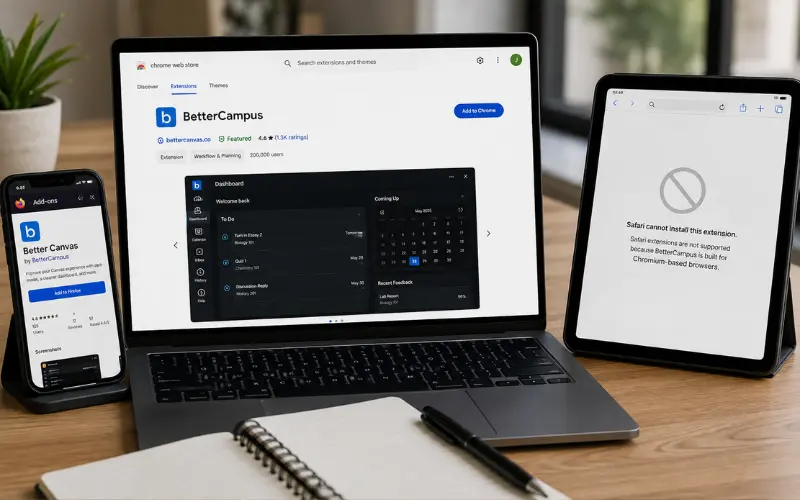
Installation itself is simple. Where people run into trouble is assuming it works the same everywhere, and it doesn’t.
- Chrome is the primary platform and gets new features first. Search the Chrome Web Store for BetterCampus, click add to browser, then open Canvas and the extension activates automatically through the puzzle-piece icon in your toolbar.
- Firefox has an official build too, listed separately on addons.mozilla.org under the Better Canvas name. Feature parity is close but not always instant. New Chrome features sometimes land on Firefox a release or two later.
- Safari cannot run it, and this isn’t a bug that will get patched. Safari uses Apple’s WebKit engine, not the Chromium engine Chrome extensions are built for, so the install button simply does nothing when you click it in Safari. Beyond the engine mismatch, shipping a real Safari extension means wrapping it inside a signed macOS app and pushing it through Mac App Store review, with a second, separate iOS App Store review if you also want it on iPhone and iPad. That’s a different product build, not a quick port, and there’s currently no BetterCampus listing on either Apple store.
- On phones, the situation follows directly from the Safari problem. There’s no dedicated Better Canvas app for iPhone or Android. Canvas’s own mobile app already looks different from the desktop site, so the dashboard customization Better Canvas relies on doesn’t have anywhere to attach on a phone. If you’re a Mac or iPhone user who wants dark mode and a cleaner to-do list without an extension, a browser-based planner that isn’t tied to Chromium, such as Coursicle, will actually load in Safari since it’s a website rather than an extension.
Free vs Pro: What Actually Changes
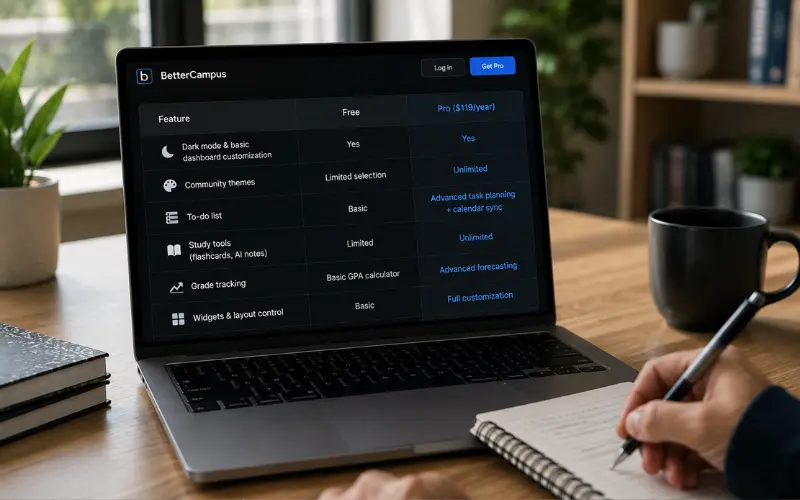
BetterCampus runs on a freemium model now, which is new compared to the extension’s earlier, fully free era. Here’s what separates the tiers.
| Feature | Free | Pro ($119/year) |
|---|---|---|
| Dark mode & basic dashboard customization | Yes | Yes |
| Community themes | Limited selection | Unlimited |
| To-do list | Basic | Advanced task planning + calendar sync |
| Study tools (flashcards, AI notes) | Limited | Unlimited |
| Grade tracking | Basic GPA calculator | Advanced forecasting |
| Widgets & layout control | Basic | Full customization |
For most students, the free tier still covers the core reason people install this in the first place: dark mode, a cleaner dashboard, and a working GPA calculator. The Pro tier is aimed at students who want AI-generated study notes and deeper task automation layered on top, which is a genuinely different use case from someone who just wants Canvas to stop hurting their eyes at 1 a.m.
Building Custom Themes That Actually Look Good
Most write-ups mention that Better Canvas “supports themes” and leave it there. What they skip is that you can build your own instead of picking from the preset list, and it takes about five minutes once you know where to click.
Every theme really comes down to two settings: a color pair and a set of card images.
- Pick two hex color codes that complement each other. A soft pastel pair works well for dark mode backgrounds, something like a pale yellow paired with a muted sage green reads as calm rather than clashing.
- Open the extension, go to Dark Mode, and enter your chosen hex codes into the background fields.
- Find or save four square image links for your course cards. Pinterest is where most students source these, since image URLs there are stable and easy to copy.
- Click into the Cards section of the extension and paste each image address against a course.
The learning curve people run into isn’t the extension being confusing, it’s font handling. Better Canvas supports custom fonts, but not every font renders correctly across the dashboard, so a font that looks perfect in the theme editor preview can default back to the system font on the actual assignments page. If a theme looks off after saving, check the font first before assuming the color codes are wrong.
Login, Setup, and Common Snags
There’s no separate “Better Canvas login.” The extension doesn’t create its own account for basic use, it simply reads your existing, already-authenticated Canvas session in the browser. If you’re logged into Canvas normally, Better Canvas activates automatically the moment the page loads. If you see a blank dashboard or the extension icon looks greyed out, the fix is almost always to refresh the Canvas tab after installing, not to look for a login screen that doesn’t exist.
Where accounts do come in is the Pro subscription and features like calendar sync or saved AI notes, which need somewhere to store your data across devices. That’s a BetterCampus account, separate from your school’s Canvas credentials, and it’s optional unless you’re paying for Pro.
Frequently Asked Questions
What is Better Canvas called now?
BetterCampus. The Chrome Web Store listing shows both names together as “BetterCampus (prev. BetterCanvas)” so either search term finds the same extension.
What happened to Better Canvas?
It wasn’t shut down or replaced. The original developer partnered with an ed-tech strategist and rebranded the project into a broader platform with a free and paid tier, built on the same underlying codebase.
Is Better Canvas safe to use?
Yes, based on its own privacy disclosures, its public GitHub source code, and clean third-party malware scans. It only reports user activity data and doesn’t request access to unrelated browsing history.
Is Better Canvas free?
The core features, dark mode, basic themes, and the GPA calculator, are free with no account required. A Pro subscription adds unlimited themes, AI study tools, and calendar sync for $119 a year.
Does Better Canvas work on Safari?
No. Safari uses a different browser engine than Chrome and Firefox, and there’s currently no Mac or iOS App Store version of the extension, so the install button does nothing in Safari.
Is there a Better Canvas app for phones?
No standalone app exists for iPhone or Android. It’s built for desktop browsers, so on mobile you’re limited to whatever Canvas’s own native app already offers.
Can I make my own Better Canvas themes instead of using presets?
Yes. Enter any two hex color codes into the Dark Mode settings and paste image links into the Cards section for each course. Custom fonts sometimes don’t render correctly, so check that first if a saved theme looks off.
Will Canvas or my school ban me for using Better Canvas?
No. It only changes how Canvas looks in your own browser and doesn’t alter grades, submissions, or anything visible to instructors. Since it’s a third-party extension and not affiliated with Instructure, expect occasional short visual glitches right after Canvas pushes a major update, until the extension catches up.
